Introduction
Week no. 1
SOOOOOO!!!!!! Miss Terrific Terry-ann Marsh came and change my whole perception of Technology in Education. After an introduction whereby students placed pin on with their names on the top left of my jacket the course outline was introduced where we were introduce to:
assure model lesson plan
blog
google drive form
mindmap, wordle, prezi
podcast
video
spreadsheet
word processed document
Task at Hand
5 Easy Steps: How to Create a Gmail Account
Google provides many benefits to those who have an account. The easiest way to have access is to set up a Gmail (or Google Mail) account. If you’re wondering how to create a Gmail account, this helpful guide can get you set up with a new e-mail in no time flat.
It’s simple and free to do, and we’ll walk you through each step of the process. Don’t worry about a thing: you won’t need a credit card or any other proof that you exist. Soon you’ll enjoy the benefits of online storage, have a gmail.com email account, and much more. This guide on how to create a Gmail account is quick, easy, and perfect for beginners.
What you’re going to need:
Just about the only thing you need is a computer and access to the Internet. You can use a tablet or smartphone, too, and if you don’t have Internet access, head down to your local café, fast food restaurant, or your local library.
Step-by-Step Guide: How to Create a Gmail Account
Most browsers will look the same when you’re setting up a Gmail account, but for those that are different, the basic gist of the process is all right here.
Step 1: Open your browser.
What’s a browser? Internet Explorer, Firefox, Chrome, Safari, Edge, etc. Whichever one you have to access the Internet (going to websites, for example) will be fine.
Open it and get to Google’s main search page. You can enter http://www.google.com.
Step 2: Click on Gmail.
In the upper right portion of the screen there are some boxes and text. One says ‘Gmail.’
Click on it.

Step 3: You’ll be taken to the Sign In page.
When the browser finishes redirecting, you’ll be at the Gmail (or Google) sign in page. This is where you can sign into Gmail if you already have an account.
You can see there are a couple of buttons (rectangular boxes) that state: Create an Account. Click on either one of these.

Step 4: Enter your information.
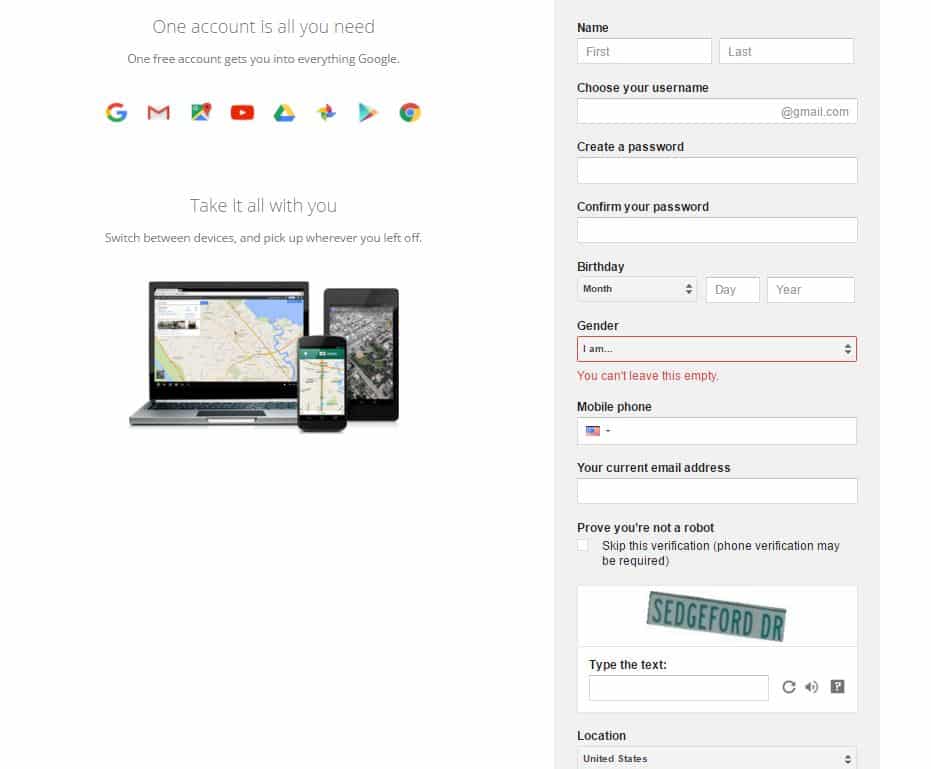
Google asks for your first and last name, a preferred username (with the exchange @gmail.com), your birthday, gender, current email address, mobile phone number, and proof that you’re not a robot.
Be honest about your name, but you can choose ‘other’ if you don’t want to specify your gender. If you don’t wish to add a mobile phone, it can be difficult to recover a lost password.
Also, make sure the password you create for your account is strong, but something you’ll remember. In fact, write it down and keep it in a safe place.
The username you want may be taken and if that’s the case, Google will suggest alternates, or you can try something else.
Finally, proving that you’re not a robot is easy. You simply enter the text shown up the box that states: Type the text:. If you can’t see it or read it, hit the reverse circle and get a new one. If you skip the verification, you may need to verify by a legitimate phone number before you can have your Gmail account.
You’ll have to agree to the Google privacy policy and terms of service before you can click to the next page.
Step 5: Enjoy.
That’s it. Now that you know how to create a Gmail account, you can get signed up in about 60 seconds. Once you click ‘Next’ your account is set up. Now you’re ready to begin sending and receiving email through your brand new Gmail account.
The role of Education and Media in Technology
Technology enhances learning and make learning easier.

There are six categories of media
videos
 visual aid
 people
text

audio

manipulates

Learning Styles

Have a look:
Learning Theories

Challenges faced in doing the task. ???????????????
There were no challenges faced, as I had created an e-mail address long before.
The information obtained in class was indeed beneficiary and I intend to implement it in my classroom. It can be concluded that learning theories are organized set of principles explaining how individuals acquire, retain and recall knowledge. By studying and knowing the learning theories, we can better understand how learning occurs. The principles of the theories can be used as guidelines to help select instructional tools, techniques and strategies that promote learning.
They are all important to understand. However, it's important to consider:
the level of knowledge of the learners
the thought processing desired
the desired outcome
when deciding which strategies to use.


Comments
Post a Comment